

Add Automatic Certificate Management Environment (ACME) to ProxmoxVE (Let’sEncrypt) via DNS.
Most of the time, http authentication for the ACME protocol is perfect. But since PVE is an infrastructure device, you might not have the option nor want to expose its port 80 on Internet, voiding the http validation.
Remains the DNS validation. I write those lines because I struggled with the (lack of) documentation, but it’s probably very easy.
First, ensure you’re DNS provider is supported by listing plugins:
ls -lh /usr/share/proxmox-acme/dnsapi
# ls -lh /usr/share/proxmox-acme/dnsapi |grep gandi
-rw-r--r-- 1 root root 5.2K Apr 25 18:07 dns_gandi_livedns.sh
In my case, it’s Gandi, and the Gandi plugin is directly available in PVE (no need to install anything).
You must first create a Gandi token from their Web UI, then ensure it’s written in a file like this:
# cat /etc/pve/gandi_token
GANDI_LIVEDNS_TOKEN=9034619778cf4fac009fa1a35d3c0aeb
After that, register the new plugin.
pvenode acme plugin add dns gandi_livedns --api gandi_livedns --data /etc/pve/gandi_token
Go the the Web UI, on one of the node, System->Certificates
Check the configuration:
root@pve1:~# pvenode acme plugin config gandi_livedns
┌────────┬──────────────────────────────────────────────────────────────┐
│ key    │ value                                                        │
╞════════╪══════════════════════════════════════════════════════════════╡
│ api    │ gandi_livedns                                                │
├────────┼──────────────────────────────────────────────────────────────┤
│ data   │ GANDI_LIVEDNS_TOKEN=xxxxxxxxxxxxxxxxxxxxxxxxxxxxxxxxxxxxxxxx │
├────────┼──────────────────────────────────────────────────────────────┤
│ digest │ 92320581a99992036cfda042d40282853d613984                     │
├────────┼──────────────────────────────────────────────────────────────┤
│ plugin │ gandi_livedns                                                │
├────────┼──────────────────────────────────────────────────────────────┤
│ type   │ dns                                                          │
└────────┴──────────────────────────────────────────────────────────────┘
In the ACME section, add a new entry, select DNS and the newly installed plugin
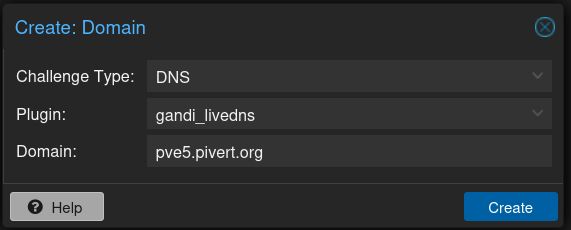
Create, then click on “Order Certificate Now”. You should see:
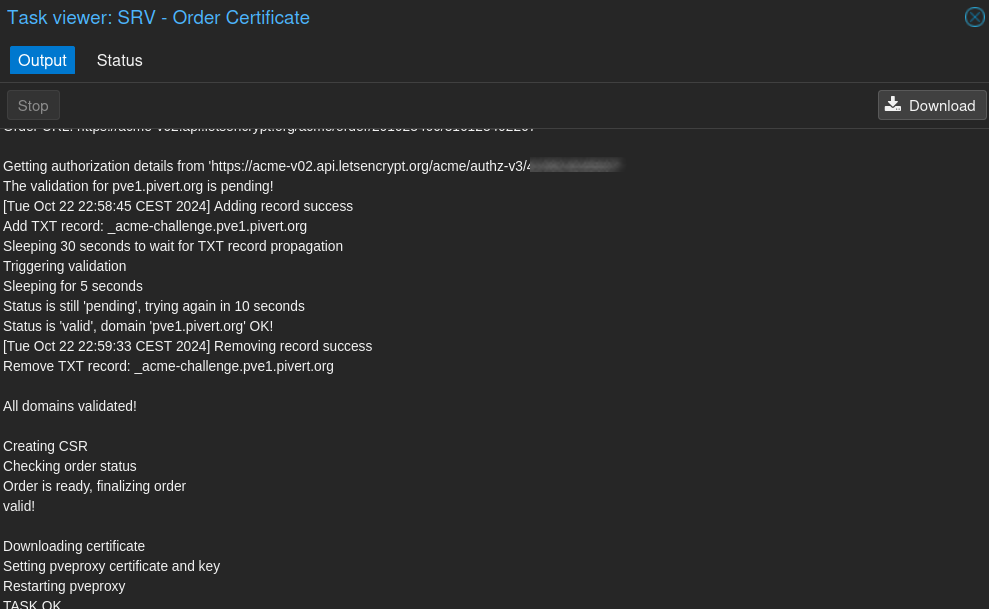
Loading ACME account details
Placing ACME order
Order URL: https://acme-v02.api.letsencrypt.org/acme/order/xxx/xxx

Getting authorization details from 'https://acme-v02.api.letsencrypt.org/acme/authz-v3/xx'
The validation for pve2.pivert.org is pending!
[Tue Oct 22 23:21:07 CEST 2024] Adding record success
Add TXT record: _acme-challenge.pve2.pivert.org
Sleeping 30 seconds to wait for TXT record propagation
Triggering validation
Sleeping for 5 seconds
Status is 'valid', domain 'pve2.pivert.org' OK!
[Tue Oct 22 23:21:50 CEST 2024] Removing record success
Remove TXT record: _acme-challenge.pve2.pivert.org

All domains validated!

Creating CSR
Checking order status
Order is ready, finalizing order
valid!

Downloading certificate
Setting pveproxy certificate and key
Restarting pveproxy
TASK OK
Then proceed for each host in the cluster.
OVH DNS
Update on 23/06/2026 – Add the OVH configuration for Proxmox VE 8.4
Find your plugin
find /usr/share/proxmox-acme/dnsapi/ |rg ovh

OK, we have it.
Check config option
root@pve1:/etc/pve/nodes# head -n20 /usr/share/proxmox-acme/dnsapi/dns_ovh.sh
#!/usr/bin/env sh
# shellcheck disable=SC2034
dns_ovh_info='OVH.com
Domains: kimsufi.com soyoustart.com
Site: OVH.com
Docs: github.com/acmesh-official/acme.sh/wiki/How-to-use-OVH-domain-api
Options:
 OVH_END_POINT Endpoint. "ovh-eu", "ovh-us", "ovh-ca", "kimsufi-eu", "kimsufi-ca", "soyoustart-eu", "soyoustart-ca" or raw URL. Default: "ovh-eu".
 OVH_AK Application Key
 OVH_AS Application Secret
 OVH_CK Consumer Key
So we now know what we should place in `/etc/pve/dns_ovh.conf` – You’re free to name the file as you wish, and I decided to place it in /etc/pve so it’s available on all nodes.
Generate credentials on OVH Cloud
We need to generate and get:
- Application key
- Application secret
- Consumer Key
First connect to : https://auth.eu.ovhcloud.com/api/createToken to create token, fill in the details and copy/paste your credentials in the /etc/pve/dns_ovh.conf
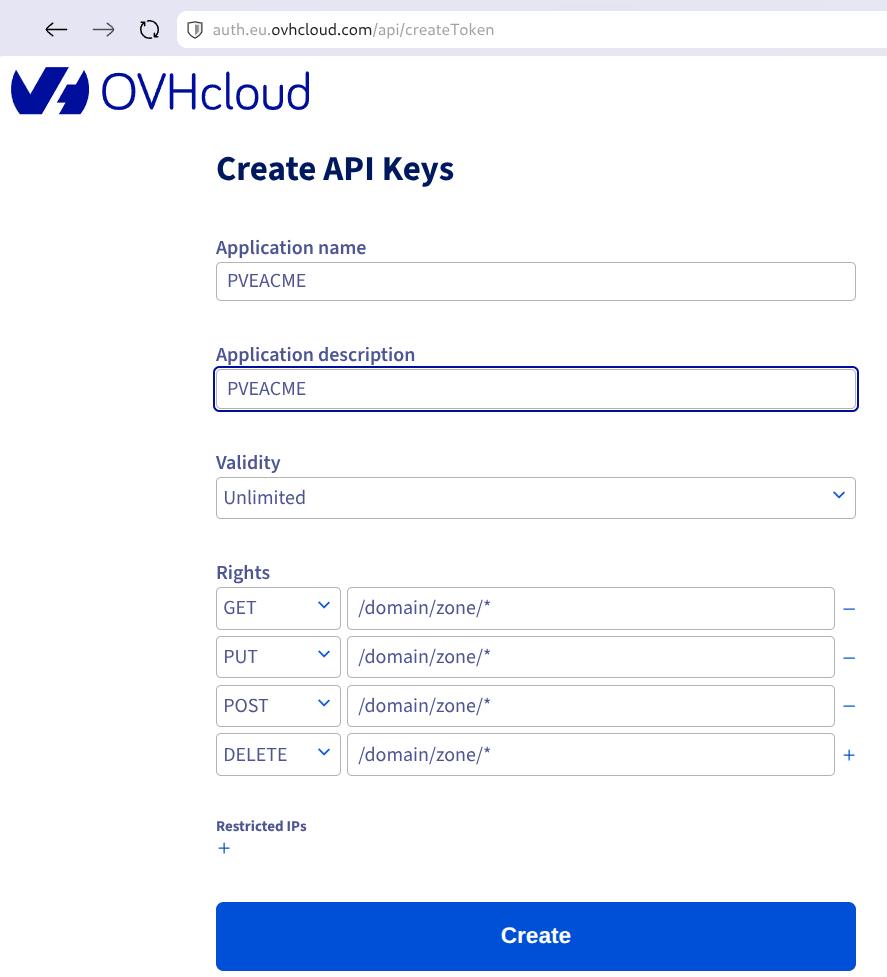
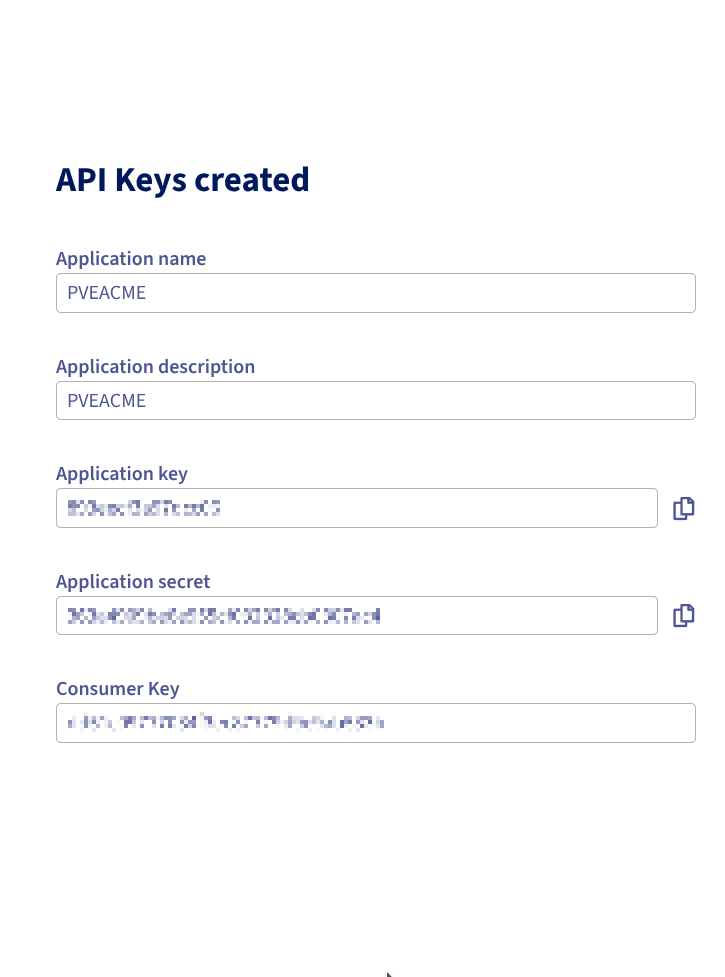
Your /etc/pve/dns_ovh.conf should look like:
sed -Ee 's/^(OVH_[AC][KS]=).*/\1xxxxxx/' /etc/pve/dns_ovh.conf
OVH_END_POINT=ovh-eu
OVH_AK=xxxxxx
OVH_AS=xxxxxx
OVH_CK=xxxxxx
Add the plugin
Run on one of the cluster member:
pvenode acme plugin add dns ovh --api ovh --data /etc/pve/dns_ovh.conf
Then check on the web UI in Datacenter → Node → System → Certificates → ACME that the ovh plugin is now available on the node. In my case Node is pve1 for instance
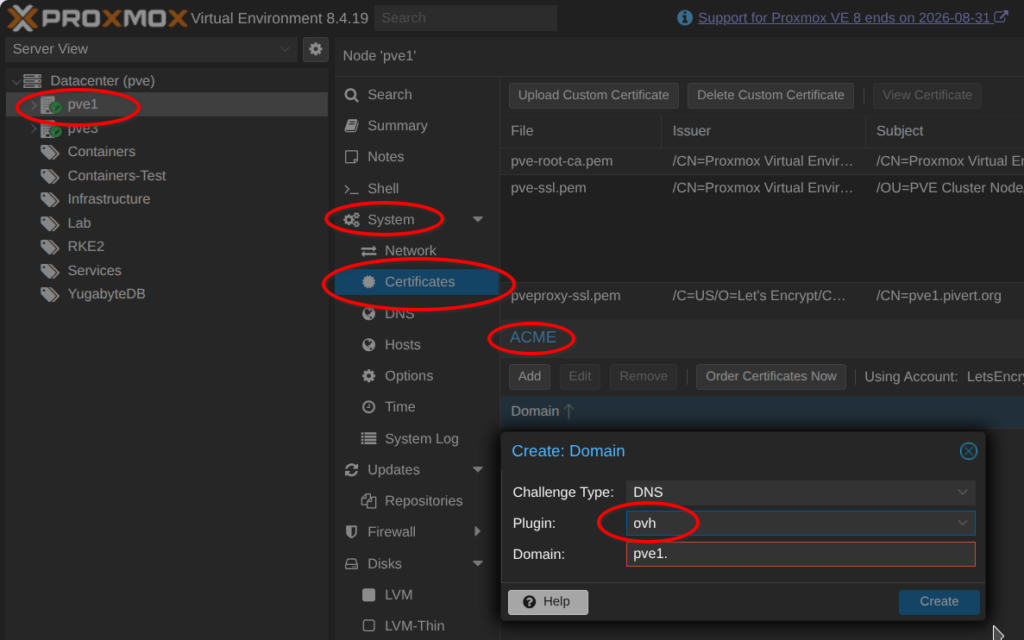
Fill in the complete FQDN (pve1.pivert.org in my case).
Order Certificates Now
Once you complete the configuration, you can use the “Order Certificates Now” button to trigger an immediate certificates generation. You should get:
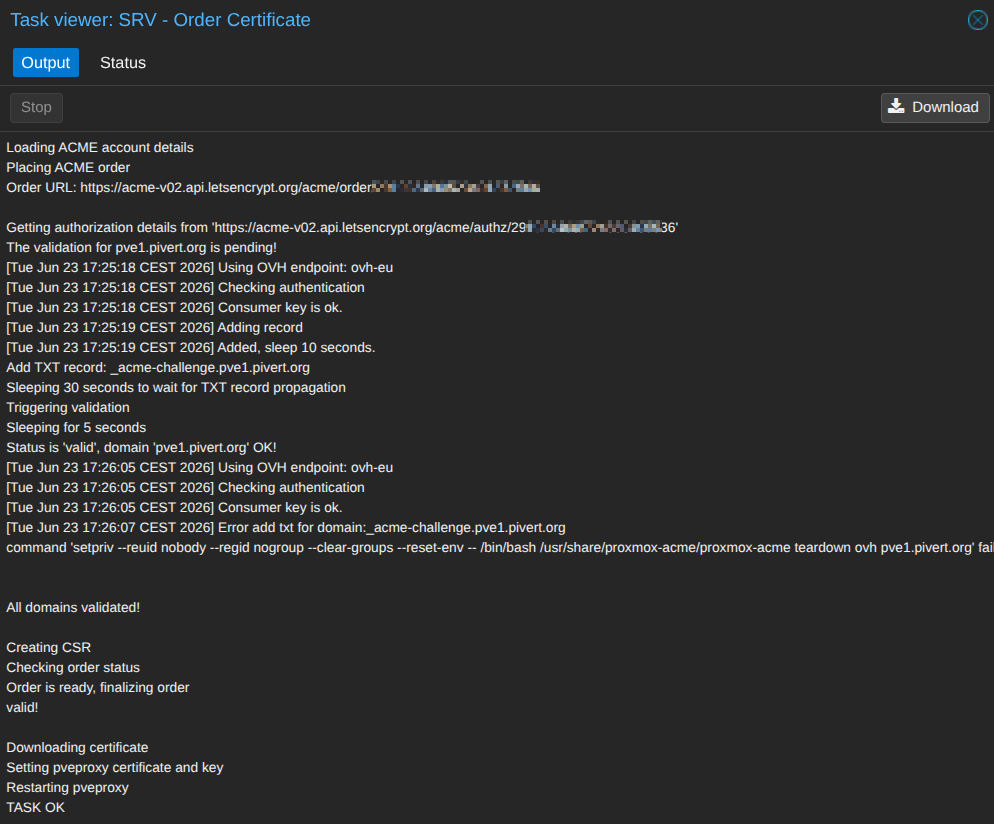
And all of this without even exposing the pve1 to Internet !!
Proceed with other cluster nodes
If you have multiple nodes, you have to add the ACME config and use the Order Certificate Now for each node via the UI.
2 responses to “Add ACME via DNS to ProxmoxVE – Let’sEncrypt”
Thank you, this was the best explanation for setting up the Gandi DNS plugin!
Now you need to modify also /usr/share/proxmox-acme/dns-challenge-schema.json and add something similar to this:
{
“majherek”: {},
“1984hosting”: {},
}
Else you will get an error:
root@pve1:/etc/acme# pvenode acme plugin add dns majherek –api majherek –data /etc/acme/majherek.conf
400 Parameter verification failed.
api: value ‘majherek’ does not have a value in the enumeration ‘1984hosting, acmedns, acmeproxy, active24, ad, ali, alviy, anx, artfiles, arvan, aurora, autodns, aws, azion, azure, beget, bookmyname, bunny, cf, clouddns, cloudns, cn, conoha, constellix, cpanel, curanet, cyon, da, ddnss, desec, df, dgon, dnsexit, dnshome, dnsimple, dnsservices, doapi, domeneshop, dp, dpi, dreamhost, duckdns, durabledns, dyn, dynu, dynv6, easydns, edgecenter, edgedns, euserv, exoscale, fornex, freedns, freemyip, gandi_livedns, gcloud, gcore, gd, geoscaling, googledomains, he, he_ddns, hetzner, hetznercloud, hexonet, hostingde, huaweicloud, infoblox, infomaniak, internetbs, inwx, ionos, ionos_cloud, ipv64, ispconfig, jd, joker, kappernet, kas, kinghost, knot, la, leaseweb, lexicon, limacity, linode, linode_v4, loopia, lua, maradns, me, miab, mijnhost, misaka, myapi, mydevil, mydnsjp, mythic_beasts, namecheap, namecom, namesilo, nanelo, nederhost, neodigit, netcup, netlify, nic, njalla, nm, nsd, nsone, nsupdate, nw, oci, omglol, one, online, openprovider, openprovider_rest, openstack, opnsense, ovh, pdns, pleskxml, pointhq, porkbun, rackcorp, rackspace, rage4, rcode0, regru, scaleway, schlundtech, selectel, selfhost, servercow, simply, spaceship, technitium, tele3, tencent, timeweb, transip, udr, ultra, unoeuro, variomedia, veesp, vercel, vscale, vultr, websupport, west_cn, world4you, yandex360, yc, zilore, zone, zoneedit, zonomi’
pvenode acme plugin add [OPTIONS]